
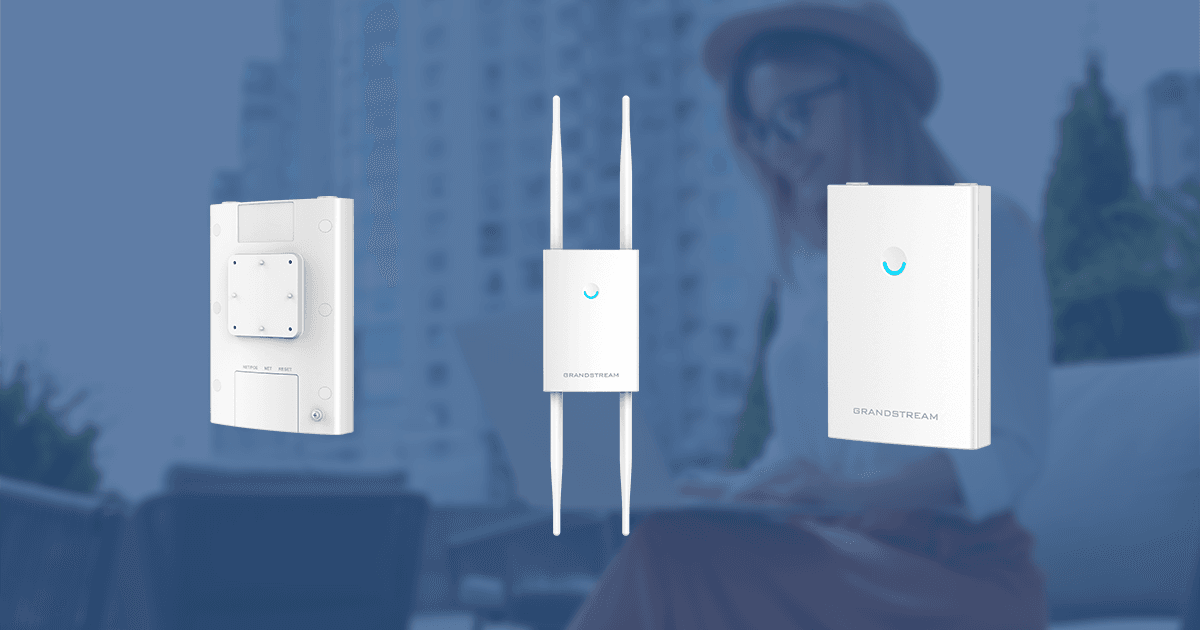
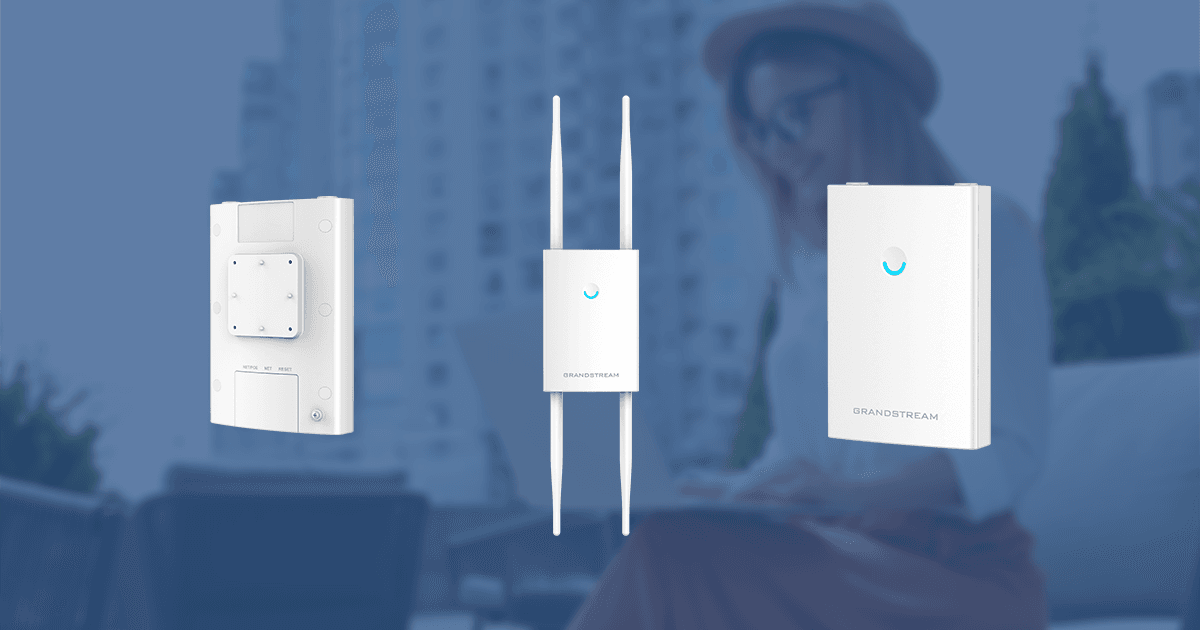
Fig.A Point d’accès Wi-Fi extérieur longue portée 802.11ac Wave-2 4x4:4 de Grandstream Networks
Remarque : cette analyse a d’abord été publiée sur le site UC Network Management de TMCNet, que vous pouvez consulter ici.
En tant qu’utilisateurs finaux dans une société mobile, nous dépendons toujours davantage d’une bonne connectivité Wi-Fi pour les applications à large bande passante et les environnements à forte densité de clients, en intérieur comme en extérieur. Nous disposons désormais de points d’accès Wi-Fi (AP) extérieurs longue portée 802.11ac Wave-2, équipés d’un contrôleur intégré et compatibles avec des systèmes de gestion centralisée et évolutive tels qu’une solution hébergée dans le cloud /un logiciel-service cloud (SaaS) ou un contrôleur WLAN virtuel (vWLAN) installé sur site. Ces AP sont également dotés de fonctionnalités, de normes réseau et de protocoles tels que : la technologie Multi-User Multiple Input Multiple Output (MU-MIMO), le pilotage de bande, plusieurs identifiants d’ensemble de services (SSID), des bandes radio 2.4GHz/5GHz doubles, la mise en réseau maillée, des ports ethernet gigabit avec PoE/PoE+,802.11ac, 802.11ac Wave 2, 802.11k, 802.11r et 802.11v, l’équité du temps d’antenne, un portail captif pour une expérience personnalisée à l’image de la marque, la fonction de pont client, le pilotage des clients, la conversion des flux multicast en flux unicast, la formation de faisceaux, ainsi que des fonctions de sécurité Wi-Fi et système telles qu’un démarrage sécurisé avec firmware signé numériquement contre le piratage, un mot de passe par défaut généré aléatoirement, un certificat de sécurité unique, WEP, WPA/WPA2-PSK et WPA/WPA2 enterprise, des ports pour connecter des antennes externes, une fonction de basculement du contrôleur maître pour la redondance et la sauvegarde, etc.
Examinons comment le point d’accès ci-dessus peut améliorer l’expérience sans fil globale de l’utilisateur final. La fonction de contrôleur intégré de l’AP permet de gérer, surveiller et configurer de manière centralisée d’autres AP et clients du réseau sans fil, sans coût ni infrastructure supplémentaires pour des contrôleurs Wi-Fi. La fonction de réseau maillé assure la redondance et crée des connexions radio sans fil entre les AP. Grâce à la formation de faisceaux, les points d’accès détectent l’emplacement des clients et orientent le faisceau de l’antenne vers eux. La fonction de pont client permet à l’AP de relier des clients câblés. Le pilotage de bande permet à l’AP de sélectionner la bande radio la moins utilisée. Le MU-MIMO, qui utilise plusieurs antennes, permet de transmettre et de recevoir simultanément plusieurs flux de données…. plusieurs flux spatiaux …pour améliorer le débit du réseau. La conversion des flux multicast en flux unicast sur la liaison sans fil contribue à préserver la bande passante pour les autres clients sans fil et améliore la qualité et la fiabilité des flux vidéo et audio. Plusieurs SSID permettent de créer plusieurs segments sans fil. Le pilotage des clients au sein du même réseau aide les clients Wi-Fi à se déplacer vers d’autres AP. Une page d’accueil personnalisée ou une page captive, c’est-à-dire une page Web affichée aux nouveaux utilisateurs Wi-Fi pour leur demander une authentification, etc., contribue à proposer une expérience personnalisée à l’image de la marque. Enfin, une plateforme centralisée de gestion Wi-Fi dans le cloud permet de gérer et de contrôler un nombre illimité d’AP dans différentes zones géographiques à l’aide d’un navigateur et d’applications mobiles, sans contrôleur Wi-Fi sur site.
La suite de cet article porte sur l’offre de Grandstream Networks, à savoir le point d’accès Wi-Fi extérieur longue portée 802.11ac Wave-2 4x4:4 GWN7630LR (voir Fig. A ci-dessus) et le contrôleur cloud GWN.cloud pour la gestion et la surveillance Wi-Fi.
Le point d’accès Wi-Fi extérieur longue portée 802.11ac Wave-2 4x4:4 GWN7630LR offre :
- Débits/interfaces réseau, prise en charge des SSID : débit sans fil jusqu’à 2.33 Gbps, 2 ports Ethernet 1Gbps et 16 SSID par AP.
- Portée & Accès client : portée jusqu’à 300m et plus de 200 clients simultanés.
- Antennes, prise en charge du MIMO, puissance Tx maximale : 4 antennes omnidirectionnelles bi-bande détachables/remplaçables -2.4 GHz-gain de 3.5dBi/5 GHz-gain de 3.5dBi, 4X4:4 2.4G (MIMO), 4X4:4 5G (MU-MIMO). 2.4G: 27 dBm 5G: 25 dBm
- Environnement/installation : fonctionnement : -30°C à 60°C. Boîtier étanche, technologie résistante à la chaleur et, installé verticalement, protection contre les intempéries de niveau IP66. Montage mural ou sur poteau.
- LED : 1 LED tricolore pour indiquer le suivi/l’état de l’appareil.
- Prise en charge de l’alimentation par Ethernet (PoE) : 802.3af/802.3at. PoE 802.3af/ 802.3at ; consommation maximale : 16.5W
- Gestion sans contrôleur : le contrôleur intégré peut détecter automatiquement, provisionner automatiquement et gérer 50 AP GWN locaux sans contrôleur distinct. Il est également possible d’utiliser GWN.cloud, une plateforme de gestion cloud gratuite pour un nombre illimité d’AP GWN, ou le contrôleur logiciel sur site GWN.Manager, qui sera bientôt disponible, pour gérer jusqu’à 3,000 AP GWN.
- Sécurité du système et du Wi-Fi : signatures numériques pour un démarrage sécurisé contre le piratage et le verrouillage des données/commandes critiques, certificat de sécurité unique et mot de passe par défaut aléatoire pour chaque appareil, WEP, WPA/WPA2-PSK, WPA/WPA2 enterprise, etc.
- Débits de données Wi-Fi et largeurs de bande de canal proposés : IEEE 802.11ac : 6.5 Mbps à 1733Mbps, IEEE 802.11a : 6, 9, 12, 18, 24, 36, 48, 54 Mbps, IEEE 802.11n : 6.5Mbps à 600Mbps, IEEE 802.11b : 1, 2, 5.5, 11 Mbps, IEEE 802.11g : 6, 9, 12, 18, 24, 36, 48, 54 Mbps, 2.4Ghz : 20 et 40 MHz, 5Ghz : 20,40 et 80 MHz
- Fonctionnalités QoS avancées pour les applications en temps réel à faible latence : 802.11e/WMM, VLAN, TOS.
A cloud Wi-Fi controller, Grandstream Networks GWN.cloud, provides Wi-Fi management and monitoring capability:
- Hosted on Amazon web services (AWS) platform, 99.9% uptime, with no limits on number of sites or AP.
- Mobile apps: available for iOS and Android.
- SSIDs: 16 per access point.
- Captive portals: Facebook, Twitter integration, customizable splash pages and multiple captive portal authentications
- Security modes: WPA, WPA2.
- Network management and alerts: monitoring, maintenance and reporting on unlimited APs and sites. Real-time status/alerts and report information on the APs and clients.
- Access and access policy: available via mobile app and or web with TLS encryption end to end and X.509 certificate-based authentication. Access policy configuration (blacklist, whitelist, time policy etc.) and bandwidth rules for client access.
You can access more information on the GWN7630LR and GWN.cloud here:
Grandstream Networks GWN7630LR
Grandstream Networks GWN.cloud
We will now conduct the functional testing of the Grandstream Networks’ GWN7630LR outdoor long-range 802.11ac Wave-2 Wi-Fi access point with the cloud Wi-Fi controller, GWN.cloud. During the testing we will run applications that required high bandwidth and low latency, such as streaming media, video-on-demand, Amazon Alexa Voice Service, real-time voice and video calls.
FUNCTIONAL TESTING
The test setup consisted of Grandstream Networks’ GWN7630LR outdoor long-range 802.11ac Wave-2 Wi-Fi access point running software version: 1.0.13.1 and cloud based Wi-Fi controller, Grandstream Networks’ GWN.cloud software version: 1.0.10.9/GWN.cloud android version:1.0.0.19 and along with the following systems (Please refer Fig.B Functional testing of Grandstream Networks’ GWN7630LR outdoor long-range 802.11ac Wave-2 Wi-Fi access point):
- Commutateur PoE de plafond numérique Microchip Technology PDS-408G — version logicielle :1.13, pour la connectivité réseau et l’alimentation PoE
- Grandstream Networks GWN7630 802.11ac Wave-2 Wi-Fi access point running software version:1.0.13.1
- Téléphone IP Wi-Fi Grandstream Networks WP820, exécutant la version logicielle :1.0.7.7
- Patton Networks’ SmartNode Virtual Enterprise Session Border Controller running software version:3.17.0-20023 on virtualization system/hypervisor Oracle VM VirtualBox software version:6.1.2
- Téléphone vidéo IP Grandstream Networks GXV3370, exécutant la version logicielle :1.0.3.3
- Microchip Technology PDS-208G Digital Ceiling PoE switch-software release version:2.53 for network connectivity and PoE delivery
- Téléphone IP de qualité opérateur Grandstream Networks GRP2614, exécutant la version logicielle :1.0.3.6
- Kit de développement audio frontal Microchip Technology AcuEdge ZLK38AVS2 pour Amazon Alexa Voice Service (AVS) basé sur le cloud.
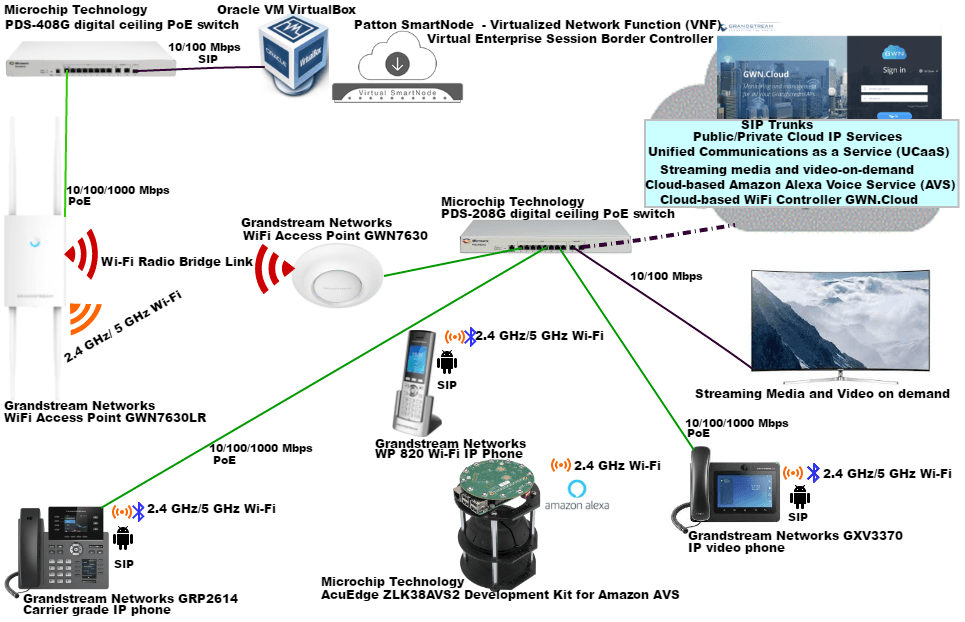
Fig.B Functional testing of Grandstream Networks’ GWN7630LR outdoor long-range 802.11ac Wave-2 Wi-Fi access point
We first mounted and connected the GWN7630LR using the provided installation accessories. Microchip Technology PDS-208G/PDS-408G Digital Ceiling PoE switches provided PoE and network connectivity. Patton networks Virtual SmartNode (vSN) as a Virtual Network Function (VNF) Session Border Controller (SBC), delivered SIP registrar services and SIP demarcation from the public SIP trunk/UCaaS provider in the cloud, while preserving interoperability and interconnectivity. Patton Cloud, a single portal network orchestration tool, was used for its provisioning and management.
We opened a browser and logged into the GWN7630LR (selected log in role as master), the ensuing setup wizard guided us through the basic setup (edited/selected the required values: Country, Time Zone, AP status showed as Master, enable SSID, SSID name, security mode, WPA key mode, WPA encryption type, WPA pre-shared key). Under SSIDs for the previously setup SSID, we edited/selected the required values for- Client bridge support, multicast to unicast, enable Voice Enterprise, enable 802.11r, enable 802.11k, enable 802.11v etc. We then moved to the next item on the menu, listed as access points. There for our APs in the test Wi-Fi network setup we edited/added/selected the correct values and configurations, starting with the GWN7630LR’s Device name, fixed IP, IPv4 address, IPv4 subnet mask, IPv4 gateway, preferred IPv4 DNS, alternate IPv4 DNS, band Steering, client steering, 2.4GHz/5GHz, mode, channel width, active spatial streams, radio power, etc. saved and applied the settings. We clicked on discover AP, paired AP GWN7630 and configured it with the appropriate values for the parameters listed above.
The GWN7630LR was now a member of the dual-band SSID that we created, and its embedded controller function was used to manage the GWN7630 AP and the Wi-Fi network clients. (Refer to Fig. C & Fig. D).
Fig.C Wi-Fi scan showing the dual band SSID 7600 for the created test Wi-Fi network
Fig.D GWN7630LR Status-Master Wi-Fi Controller- Web GUI interface
We switched the Wi-Fi controller role between the APs on the Wi-Fi network. For the GWN7630, clicked on the icon for Transfer to master to designate it as the new master Wi-Fi controller (Refer to Fig. E). and we could also revert it back, by clicking the icon Transfer to master on the GWN7630LR.
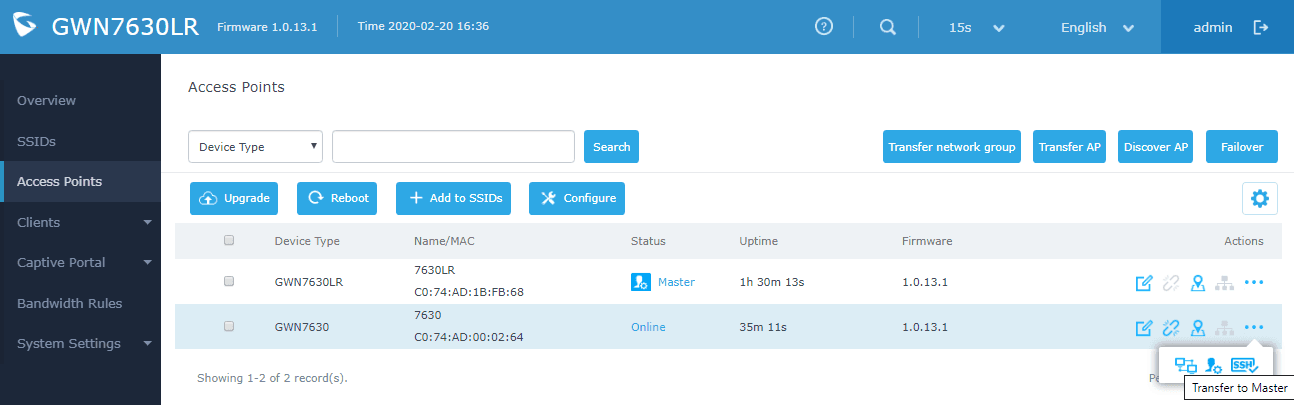
Fig.E GWN7630 Status Screen-Transfer to Master Wi-Fi Controller
Validated the client bridge feature, the GWN7630 AP was deployed as a bridge to link the remote ethernet network. The GWN7630 AP status showed client bridge mode = isolated and the remote ethernet segment was bridged over the Wi-Fi connection (Refer to Fig. F)
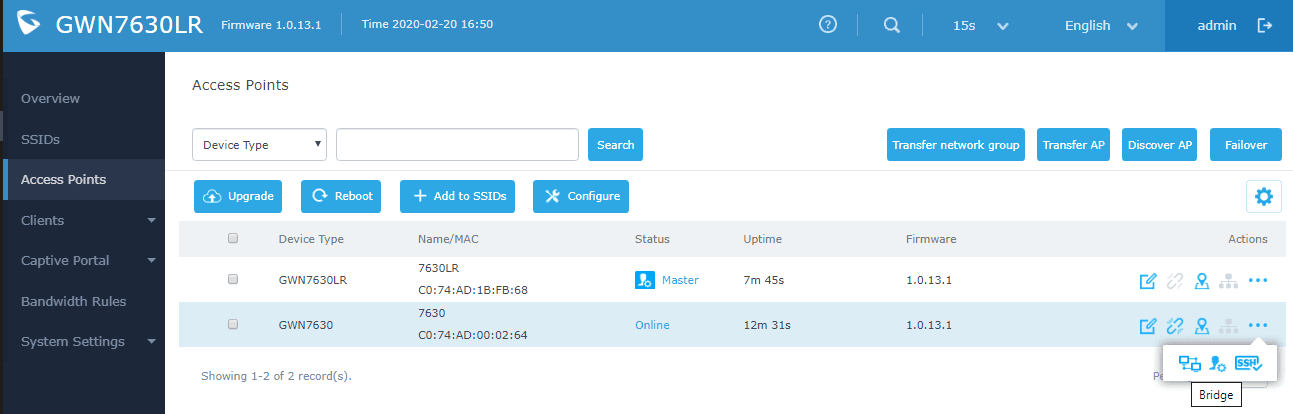
Fig.F GWN7630 Status-Client Bridge mode
Over the setup dual band Wi-Fi network, we tested- Microchip Technology’s AcuEdge ZLK38AVS2 Front end audio Development Kit connectivity to the cloud-based Amazon Alexa Voice Service (AVS) and SIP registration/connectivity of: the Grandstream Networks GXV3370 IP video phone, Grandstream Networks WP820 SIP Wi-Fi phone and Grandstream Networks GRP2614 carrier grade IP phone. We were successful in registering and placing inbound/outbound voice calls with the ITSP’s external SIP trunk/UCaaS platform in the cloud through the Patton networks Virtual SmartNode(vSN) as a Virtual Network Function (VNF) Session Border Controller (SBC). Matter of fact, over the Wi-Fi network, we were able to run applications that required high bandwidth and low latency, such as real-time voice, video calls, streaming media and video-on-demand.
It was now time for us to transfer the GWN7630LR and the GWN7630 APs to the GWN.cloud. For that we clicked on the Transfer network group button , it allowed us to transfer our local configurations to our cloud account [prompted us to create a network by entering a new network name for the network group) and alternatively if we clicked on Transfer AP button [it would have allowed us to select a pre-existing network group and move our APs in to it] (Refer toscreenshot excerpts Fig. G).
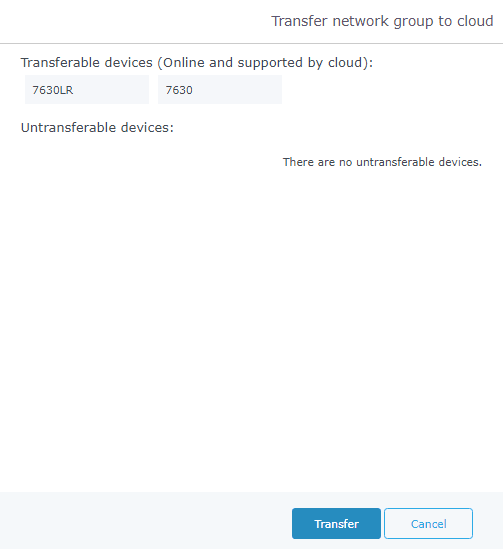
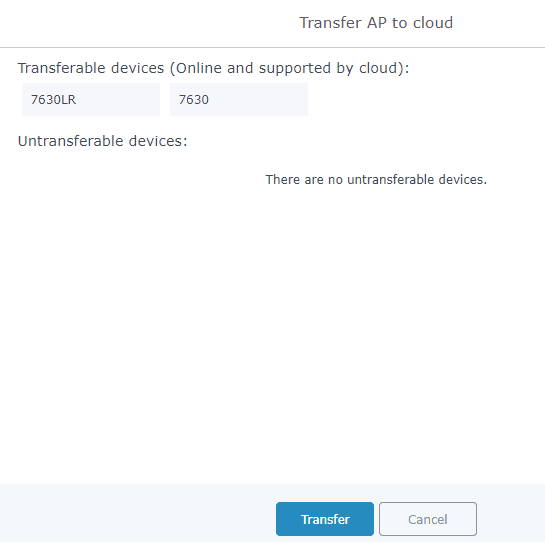
Fig. G GWN7630-Transfer Network Group/Transfer AP Status Screens
We were able to successfully transfer to the GWN.cloud [cloudhosted/CloudSoftware-as-a-Service (SaaS)], using a browser we continued to manage, monitor and report on the Wi-Fi network, access points and the clients. (Refer to Fig. H)
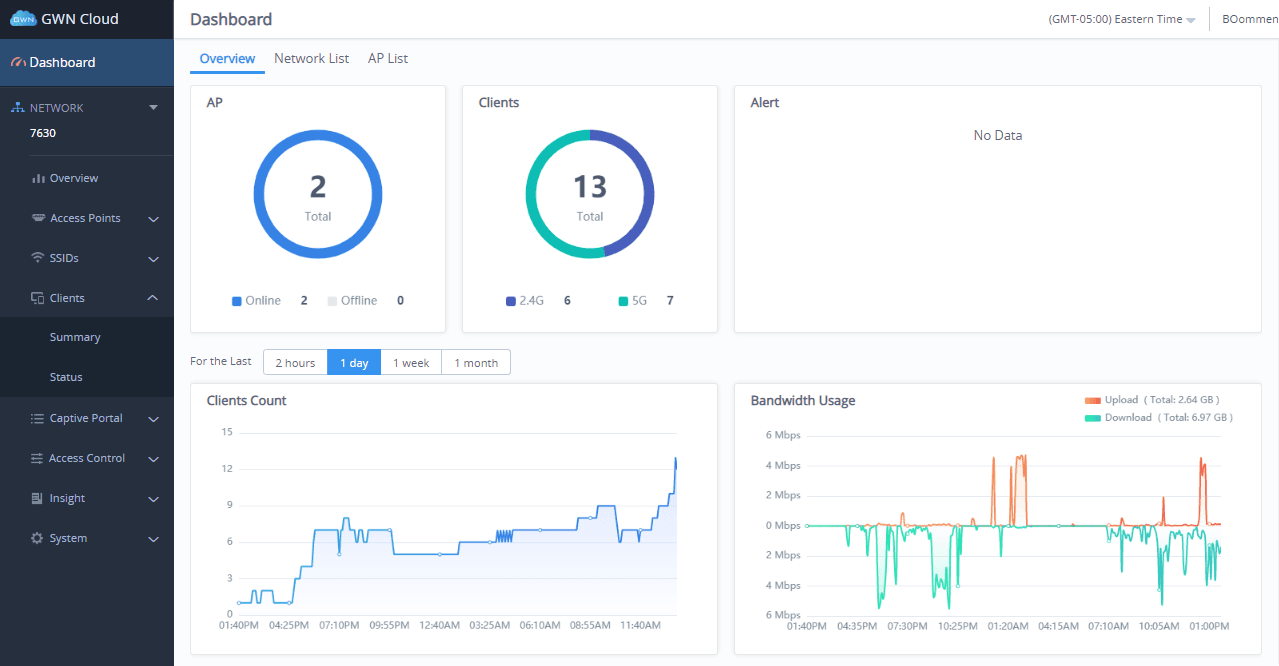
Fig.H GWN.cloud cloud hosted /Cloud Software-as-a-Service (SaaS) Dashboard view
All complex features and functions supported on the GWN7630LR were now available on the web-based management interface. For us, the deployment was simple and straight-forward, just a few clicks away, thanks to the well laid out and intuitive onscreen menu layout. All we needed was a browser and or the GWN.cloud android version running on our smart phone to access the real-time data, status/alerts and report information on our test Wi-Fi network, clients and APs. We could configure and modify GWN7630LR’s functions and features using the web based Grandstream management interface, giving us complete control over the setup Wi-Fi network, access points and clients. The browser interface gave us access to the GWN7630LR unit’s administration, monitoring, reporting and alerting functions.We were up and running expeditiously, using the embedded Wi-Fi controller and the GWN.cloud. It is noteworthy that the migration to the cloud was easy and the functionality testing was a success as everything worked satisfactorily.
Conclusion
Grandstream Networks’ GWN7630LR outdoor long-range 802.11ac Wave-2 Wi-Fi access point is a cost-effective Wi-Fi solution that was very easy to setup as it supports an embedded Wi-Fi controller and the GWN.cloud, a cloud hosted /Cloud Software-as-a-Service (SaaS) platform. We would exhort you to check it out as a part of your improved Wi-Fi wireless strategy for long-range and/or outdoor Wi-Fi deployments, as it offers, a 300-meter range and weatherproof casing.